👋 Welcome
☁️ About This Project
Private Cloud Storage is a self-hosted file storage and sync system built on a Raspberry Pi 4 🍓, running Nextcloud ☁️ inside Docker 🐳 containers. It replicates the core experience of commercial cloud storage services — file storage, sync, sharing, and mobile access — while keeping all data physically owned and controlled by the user, rather than stored on a third-party company's servers.
This documentation records the full build process 🛠️: the hardware used, the software stack, the setup and configuration steps, and the ongoing maintenance of the system. It is written both as a personal build log and as a reference guide that others could follow to replicate the project.
🏆 Sponsored by
This project is proudly sponsored by Brunel Cybersecurity Society 🎓 and the CyberTutor Platform 💻🔐 — supporting hands-on learning in cloud infrastructure and security.
🧩 What Is This Project?
At its core, this project turns a low-power, low-cost single-board computer (the Raspberry Pi 4) into a dedicated home server. An SSD attached to the Pi provides the storage capacity, while Nextcloud — an open-source, self-hosted alternative to services like Google Drive, Dropbox, or OneDrive — provides the software layer that turns raw storage into a usable cloud platform: file uploads, folder sync across devices, sharing links, calendar/contacts sync, and a mobile app.
The entire application stack (Nextcloud, its database, and its cache) runs inside Docker containers, which keeps the system modular, easy to back up, and easy to rebuild from scratch if something goes wrong.
🎯 Objectives
- Data ownership — Keep personal files, photos, and documents stored on hardware the user physically owns and controls, instead of relying on third-party cloud providers.
- Privacy — Remove reliance on external companies scanning, indexing, or monetising personal data.
- Learn practical self-hosting & DevOps skills — Hands-on experience with Docker, Docker Compose, Linux server administration, reverse proxies, and container orchestration, directly relevant to a cloud/security engineering career path.
- Low-cost, low-power infrastructure — Prove that a full private cloud can run on inexpensive, energy-efficient hardware (Raspberry Pi 4) rather than a full server or paid cloud subscription.
- Multi-device sync & access — Access, upload, and sync files seamlessly across desktop, mobile, and web, matching the convenience of commercial cloud storage.
- Foundation for future security work — Build a platform that can later be hardened and used as a testbed for applying cybersecurity practices (access control, encryption, hardening, monitoring) learned elsewhere.
- Documented, repeatable build — Produce documentation detailed enough that the entire project could be reproduced (or recovered after failure) from these pages alone.
🙋 Who This Is For
This documentation is written primarily for the project owner as a build/reference log, but is structured so that anyone with basic Linux/networking familiarity could follow it to build their own private cloud storage server.
🗺️ Project Workflow Diagram
The diagram below shows the end-to-end architecture and access flow used in this project:
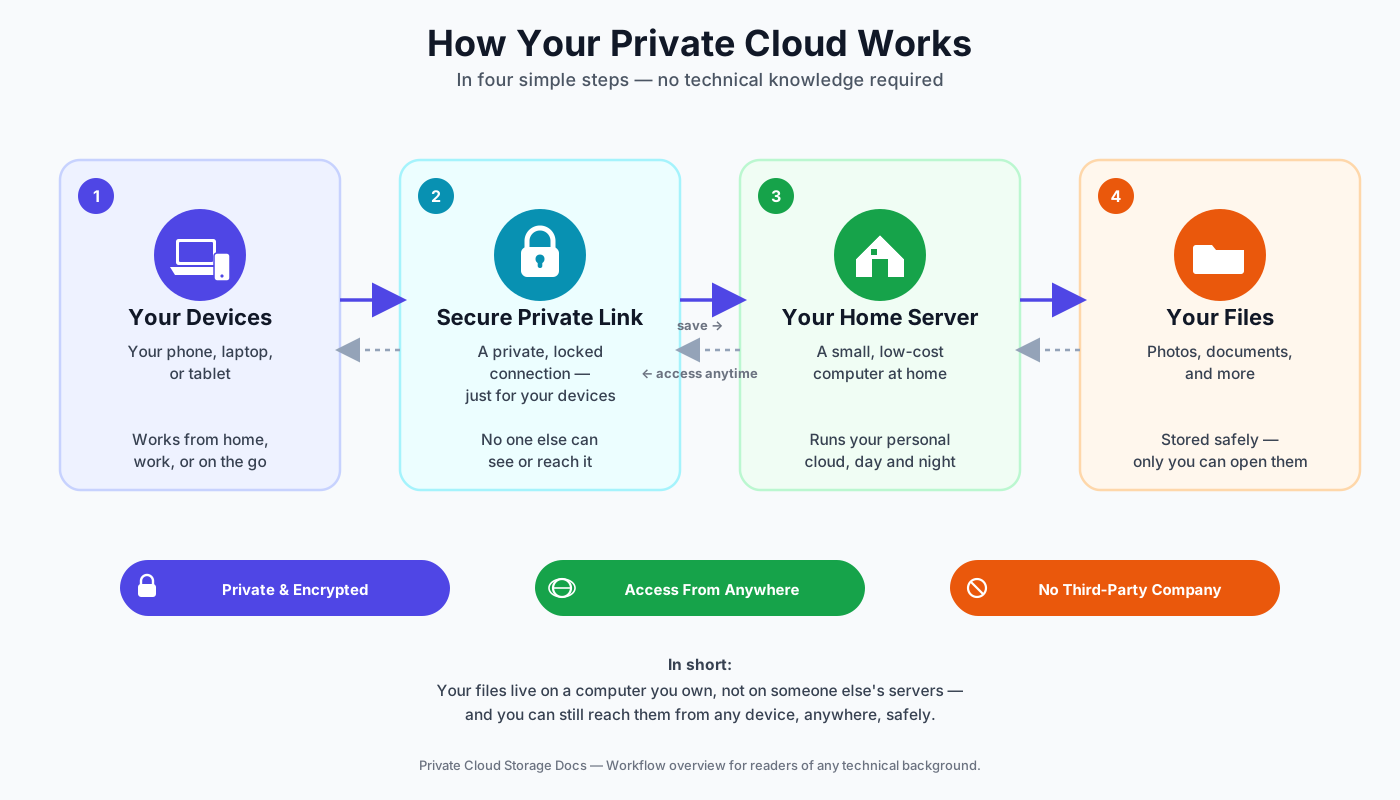
Workflow Summary
- Build & prepare the Pi server (OS, SSD, base packages)
- Deploy Nextcloud on the Raspberry Pi
- Secure remote access with Tailscale (identity-based VPN)
- Connect client devices (laptop/phone) through Tailscale
- Use Nextcloud safely from any network (including mobile hotspot)
- Operate and troubleshoot using the command playbook
📚 What's Covered in This Documentation
| Section | Purpose |
|---|---|
| Requirements | Hardware parts list and software prerequisites needed before starting |
| Installation | Flashing the OS, initial Raspberry Pi setup, and preparing the storage |
| Nextcloud Deployment | Installing and deploying Nextcloud, including first-run setup and validation |
| Network & Remote Access | Local network access, port forwarding / reverse proxy, remote access setup |
| Backup & Maintenance | Backup strategy, updates, routine maintenance |
| Connection Scale | How remote access stays fast and secure as more devices connect |
| Operations & Troubleshooting | Command playbook, diagnostics, and issue-resolution guidance |
| About the Developer | Project owner profile, educational resources, and contact links |
🚧 Status
Installation is now underway 🔧 — the cooling fan is mounted, the SSD is connected, and the OS flash has started. Follow along on the Installation page, updated as the build progresses.