🔗 Connection Scale
This page covers connection scalability for the Private Cloud Storage project — how remote access is designed so the same Nextcloud instance stays fast, secure, and reachable as more devices join, regardless of which network they're on.
🏆 Sponsored by
Supported by Brunel Cybersecurity Society 🎓 and the CyberTutor Platform 💻🔐.
📱 One account, every device
The screenshot below is the real test: the same Nextcloud account, signed in simultaneously on a laptop and three phones — all reaching the same files at the same time, from different networks.
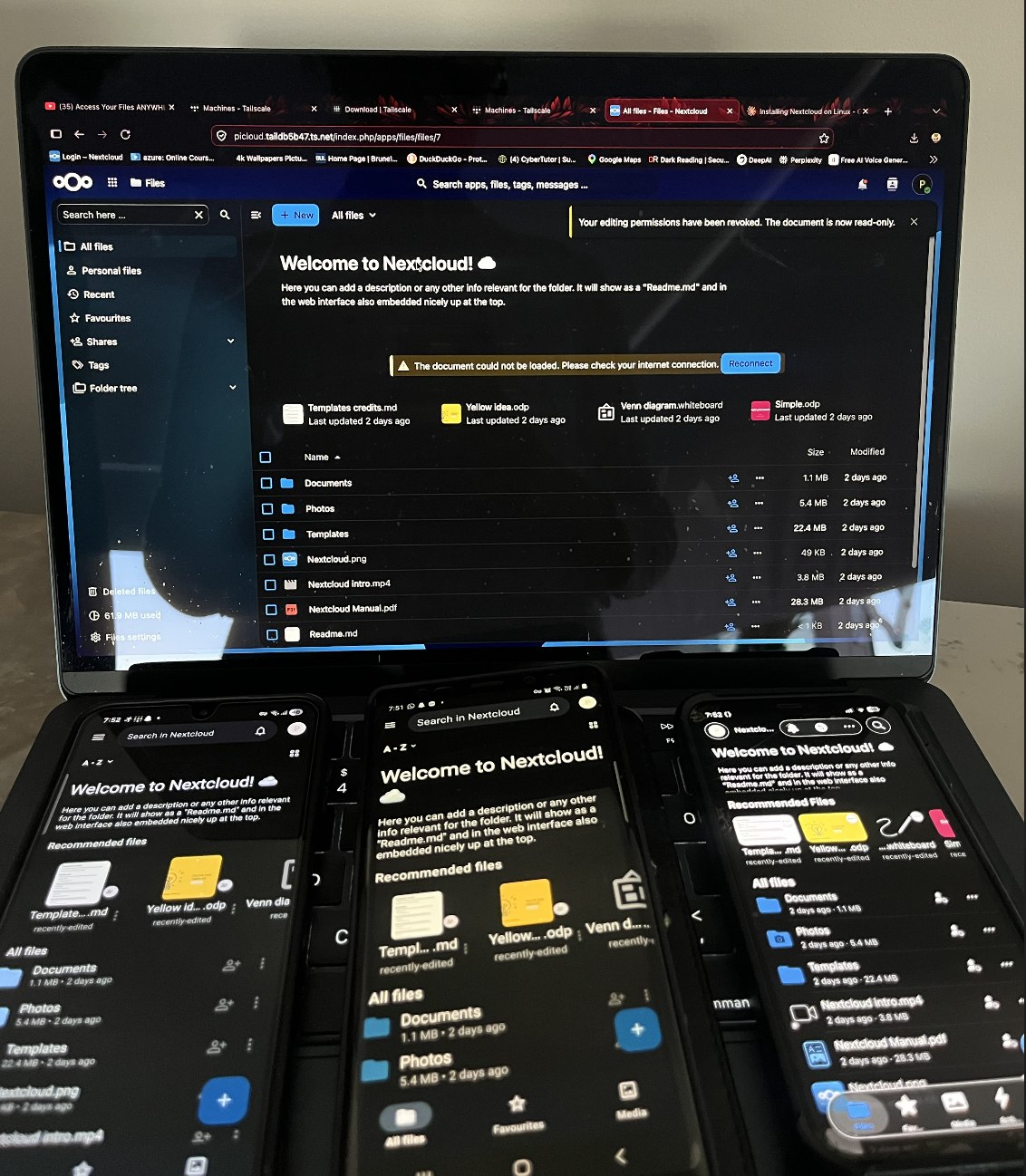
This is the practical payoff of the Tailscale setup: the Pi is reachable by its stable picloud.<tailnet>.ts.net address from any device on the tailnet, with no port forwarding, no changing IP to remember, and no extra login step beyond the Nextcloud credentials themselves.
🧠 Why connection scalability matters
A private cloud should give every client — desktop, laptop, tablet, or phone — reliable access without turning into a bottleneck as more devices get added. This build handles that with a few deliberate choices:
- Identity-based access (Tailscale) replaces IP-based access rules, so adding a new device is "log in and go" rather than reconfiguring firewall rules or port forwards each time.
- SSD-backed storage keeps I/O contention low even as more clients sync or browse files at once — see Requirements for why the SSD was chosen over the SD card in the first place.
- Containerised services (Nextcloud, database, cache) mean each component can have its resource limits tuned independently as load grows, instead of one monolithic install competing for the same resources.
✅ Practical recommendations
- Use MagicDNS (Tailscale) for a stable hostname across networks, and add that hostname to Nextcloud's trusted domains — this is what makes the address the same everywhere instead of changing per network.
- Keep an eye on I/O and memory under sync-heavy use; the SSD and available RAM are the first things to check if multiple devices syncing at once starts to feel slow.
- A reverse proxy with HTTPS (Caddy, Nginx) is optional on top of Tailscale but worth adding if the plan is ever to expose the server outside the tailnet too.
🧾 Quick checklist
- [ ] Confirm the Tailscale node is healthy:
tailscale status - [ ] Verify the Nextcloud service is running:
sudo snap services nextcloud - [ ] Check storage headroom:
df -handsudo du -sh /var/snap/nextcloud/common/* - [ ] Test from at least two networks (e.g. home Wi-Fi + mobile hotspot) to confirm access isn't tied to one connection
This page pairs with Network & Remote Access for the Tailscale setup itself, and with the Operations & Troubleshooting playbook for keeping things healthy as usage grows.